Monday, April 13, 2015

Unboxing Vigica C90T smart tv box by China Gadgets reviews

VIDEO & PHOTO GALLERY: UNBOXING VIGICA C90T SMART TV BOX by China Gadgets reviews


Vigica Company just send me this week a new and powerful Android TV Box: Vigica C90T. Today I'll show you photos and a video from the unboxing of this great model.

The TV box has a black plastic case, it is strong and well organized and all the connectorsare located in the back of it. The overall impression is pretty nice, the device looks to beconstructed with a lot of care to details. In the front side it has only the IR receiver and the panel for guiding ligths.

The cardboard gift packaging looks like is made of recycled paper, which is a big plus for Vigica, showing the company's care for the environment.


Vigica C90T was launched recently and is based on Amlogic S805 Quad core processor. It has 1GB of RAM, 8GB of ROM and it runs Android KitKat 4.4.2. The Android Smart TV Box has inside also a powerfull DVB-T2 tuner.


VIGICA C90T Highlights
CPU: Amlogic S805 Quad Core Cortex-A5 Up to 1.5GHz
GPU: Quad Core Mali-450 Up to 400MHz
RAM Memory: 1GB DDRIII

Flash: Nand Flash 8GB
WiFi: AP6210 802.11 b/g/n
Blutooth: Support
IR: Infra-red Remote control
Mould: Black
LED Indicator: Power ON: blue; Standby: Red
Wall mount


Ports
1 x Antenna In
1 x Antenna Out
2 x USB 2.0
1 x SPDIF Audio Output
1 x HDMI 1.4b output
1 x A/V Out
1 x MicroSD Card Slot
1 x Ethernet LAN RJ45
1 x Power input 12V / 1.5A
1 x LED Indicator


Package Content
1 x Vigica C90T Smart TV Box
1 x Power Adapter
1 x HDMI Cable
1 x IR remote
1 x English User Manual

I'll be back soon these days with the first impression story, so stay close.


About Vigica

Shenzhen Vigica Technology Co., Ltd. is a professional multimedia video products manufacturer. Vigica will become a modern enterprise group.Our main products is Android TV Box, Android with DVB-S2/T2/ATSC/ISDB, Android Mini PC, fly mouse, ipush dongle, wireless category products.Red represents vitality, orange for creativity, blue for scientific and technological strength, meaning we exchange-good company is committed to developing excellence, efficient, capable people, limitless energy, adhering to the scientific concept of the infinite, and times, the courage to innovate understanding and use of new technology production and marketing of quality products, satisfy the stability of the customer purchased the product, price and service satisfaction of dominance.


original link:
http://chinagadgetsreviews.blogspot.ro/2015/04/video-photo-gallery-unboxing-vigica.html

Sunday, April 12, 2015

How to run Arabic iptv program on Vigica tv box?

Recently, hot promotion arabic iptv chanels for vigica tv box. Vigica C60S, Vigica C60T, Vigica C70S, Vigica C70T, Vigica V5,Vigica V3 all models can run arabic iptv programs. 


Detail pictures for you

Application menu, choose IPTV


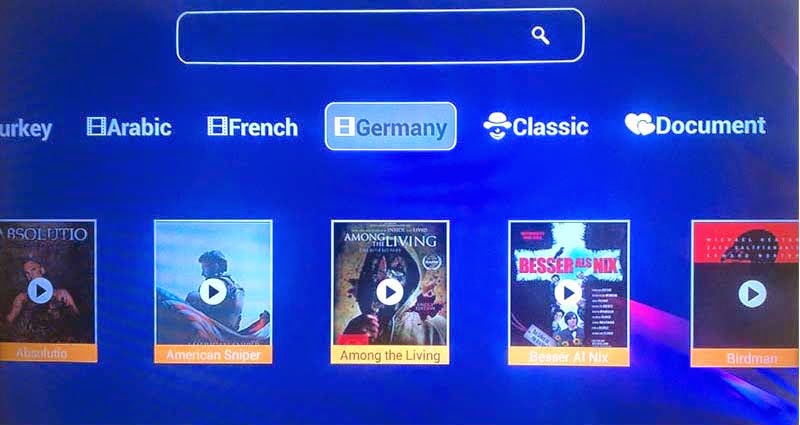
 three options----Live(about 112 chanels), Movie, Webtv


Movie(Turkey,Arabic,French, Germany, etc)


Live channels   Run more BeIn sports Channels


Full screen when watching TV channels


Thursday, April 9, 2015

CCcam format and copy account for Combox Vigica C60S and C70S

Until Now, Vigica Android & DVB-S2 tv box have been posted out for a long time, the box have get more customers chasing, but how to operate the cccam.cfg, some customer still have some doubt. 

C60S and C70S, please update the firmware to 20141205 version firstly. 
this version you can upload more account by USB, usually named CCam.cfg. 

the context list as following, please write like this (Please according your account, change the details, following just a example)
C: 11010.f3322.org 7650 50001023 27033 yes 
.... 

Then please copy the CCcam.cfg files to the USB,

Connect the box with TV and Antenna, power on the Vigica tv box, 
Go enter installation, then presss 111111, you can get the following menu.


Choose smart data


Please insert the USB to the box, press yellow buttom on remote control(Import), the account data will restore to the box.


If your box have already exited CCCam account, you also want this account in the box, please write this account to the files together, copy the files to the USB, then choose import. 

Connect with internet, the account will connect successful. 

Then you can open your scrambled channels


if you want to copy the CCcam account to other box, you can choose export, save CCcam account files to the USB. You can save the data to the PC. 

Friend, if you still have trouble for this, welcome to chat with us. 

Email: info@vigica.cc

Thanks for your times.

Thursday, April 2, 2015

Arabic IPTV Android dvb-s2 Vigica Tv box Support CCcam, Newcamd


Arabic IPTV Android dvb-s2 vigica C70S Support CCcam, Newcamd
1. CPU: AML8726-MX Up to 1.5GHz ARM Cortex Dual-core A9
2. Memory: DDRIII 1GB
3. Flash: Nand Flash 4GB
4. WiFi: 802.11 b / g / n
5. Support free Arabic IPTV channel
6. Support CCcamd, Newcamd


Arabic channel list:


Video for channels

Tuesday, March 31, 2015

Vigica move to New address


Dear All Customer

Vigica move to new address, the details as following:

4th Floor, No.242 Xixiang Road, Baoan District, Shenzhen, China


Map:


Our office


Welcome to our office!

Tuesday, March 24, 2015

China to lead world GDP growth for next two years


China is set to post GDP growth of 7.2 percent this year and 7 percent next, the Asian Development Bank said in its annual economic report on Tuesday.

Asia's largest economy is likely to retain its position as the biggest contributor to world GDP growth over the next two years.

"China's economy can continue to deliver solid growth as long as the government makes steady progress on its reform agenda which can elevate productivity" said ADB chief economist Shang-Jin Wei.

"Deepening financial sector reform, such as reducing the dominance of State-owned banks and liberalizing interest rates while preserving financial stability, is a key element of the needed reform package" he said.

China's economy will contribute 32 percent of world growth this year, compared with 16 percent from India, the report said.

The strengthening of the RMB against the currencies of most the country's partners that began in 2014 may continue in 2015, in line with a strongly appreciating US dollar and the still close connection between the two currencies, according to the ADB report.

"The monetary policy in China will continue to strike a balance between limiting credit expansion in the financial and property sectors, while accommodating the need for credit support to small and medium-sized businesses" it said.

Vigica will face more challenge, will burden more responsiblity for everyone.


The News from chinadaily.com.cn

Friday, March 20, 2015

CCcam format for Combox Vigica C60S and C70S C90S


Until Now, Vigica Android & DVB-S2 tv box have been posted out for a long time, the box have get more customers chasing but how to operate the cccam.cfg, some customer still have some doubt.


C60S and C70S, please update the firmware to 20141205 version firstly.

this version you can upload more account by files, usually named CCam.cfg.


the context, please write like this (Please according your account, change the details, following just a example)

C: 11010.f3322.org 7650 50001023 27033 yes

C: 11010.f3322.org 7650 50001023 27033 yes

C: 11010.f3322.org 7650 50001023 27033 yes

C: 11010.f3322.org 7650 50001023 27033 yes

C: 11010.f3322.org 7650 50001023 27033 yes

....


if your box have already exited CCCam account, you also want this account in the box, please write this account to the files together, copy the files to the USB, then choose import.


Go enter installation, then press 111111, you can enter Smart Data, insert the USB to the Vigica box, then choose import. The list will come into the Vigica box.


if you want to export the CCcam account to USB, you can save the account in the PC.


friend, if you still have trouble for this, welcome to chat with us.


Email: info@vigica.cc


Thanks for your times.