Showing posts with label vigica c70t. Show all posts

Friday, April 17, 2015

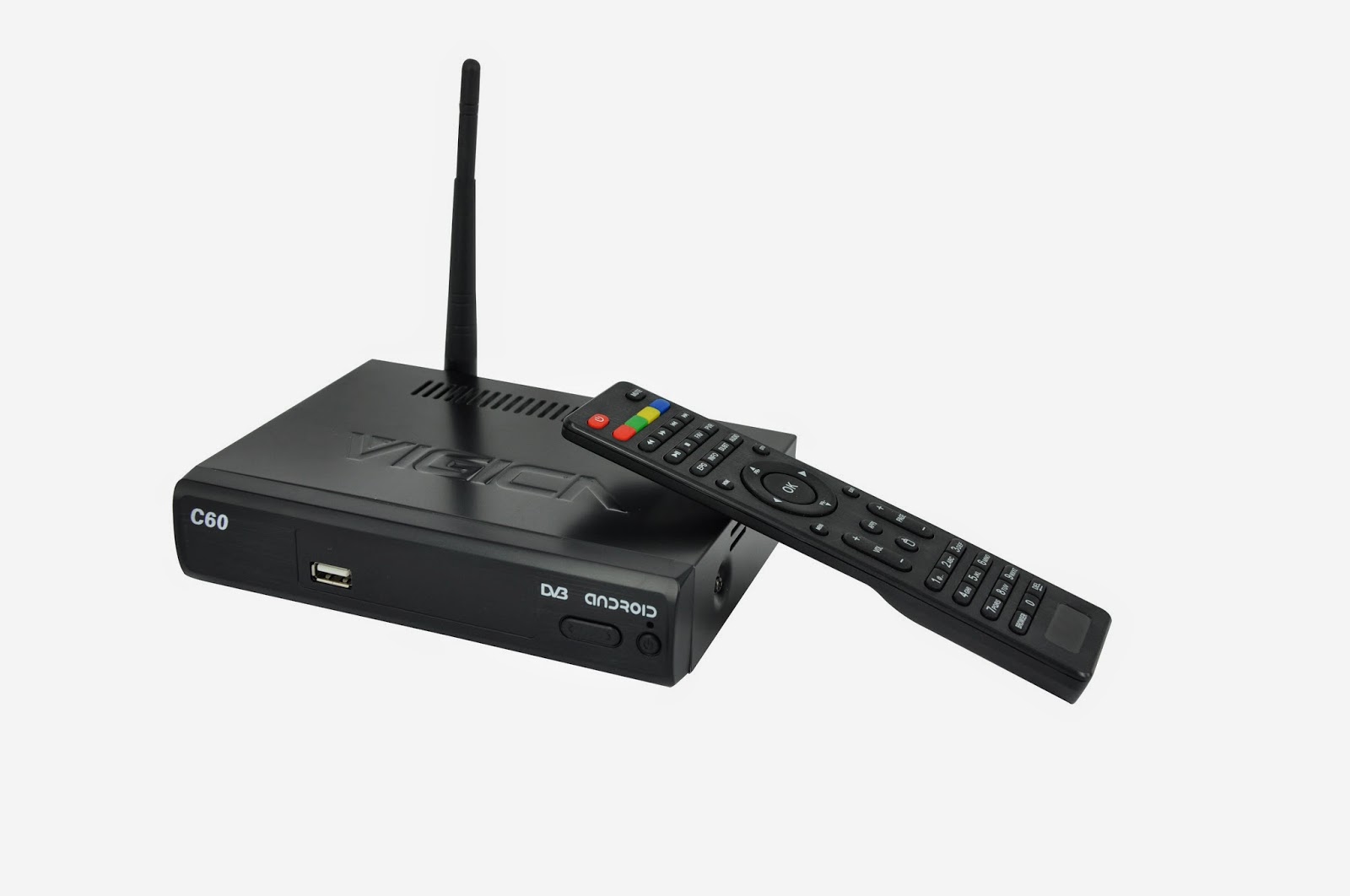
Mobile phone as remote control for android tv box vigica c60 and c70


Mobile phone as a remote control for android tv box vigica c60 and c70

Firslty, please download the applicaiton from the website,
https://drive.google.com/folderview?id=0B_AK94MdnE7wZFl3QTJGUUxJZmc&usp=sharing

Then install the application on your mobile.


Open the SettingMbox in your tv box, connect your wifi, and also make your mobile phone in the same wifi connecting.


Open the advanced icon on menu, then make the Remote control Icon ON. It will show a IP address. Like following 192.168.0.20


Open your mobile phone---choose the application, searching the server, can find the tv box address, connected,


The mobile will show a picture, like remote control, your mobile phone can be as a remote control to operate your tv box.


We can watch tv, video, surfing on line, also can modify the volume.


The mobile also can be as a mouse and keyboard, you can free switch by yourself.


It is very easy. Come on, take out your mobile phone and tv box.


More details, please visit 
www.vigica.cc

Saturday, December 27, 2014

New products Android Smart TV Box DVB Vigica C90S and C90T,welcome to Chat

New products Android Smart TV Box DVB Vigica C90S and C90T,welcome to Chat


Android&DVB has been a favorite of ours here at vigica.cc. We were very excited when Vigica unveiled the Andorid&DVB combo C90 back in January at the 2015 spring international consumer goods fair in Moscow, Russia .The android+DVB have been out for a few months now, but we haven’t had the opportunity to give our combo C90 review sample the attention it deserves. Well, it’s time to fix that! Here’s our in-depth review of the Vigica C90 android with dvb-s2 or t2 Combo.


Nope, you’re not seeing double. These are two types of C70 Android TV box: The dual core C70S and C70T. Why to show these, you ask? It’s actually fairly simple. The spec that’s going to jump out at you is that the Vigica C90 is quad core CPU. But that’s not the important part. The real advantage to the Vigica C90 is that it includes the Amlogic S805 CPU which supports hardware decoding for Dolby True HD and DTS HD Bypass audio formats through HDMI.
                     

The Amlogic S805 is the Quad-core replacement for the dual-core MX chip found in popular streaming boxes like the Vigica C70. The S805 continues Amlogic’s solid history of XBMC support, but increases performance dramatically.

This is C90S spec. For reference.


CPU
Amlogic S805  Quad Core Coretex-A5 Up to 1.5GHz
GPU
Quad Core Mali-450 Up to 400MHz
Memory
DDRIII 1GB
Flash
Nand Flash 8GB
WiFi
 AP6210  802.11 b/g /n
Blutooth
Support
IR
Infra-red Remote control
Mould
Black
LED Indicator
Power ON :blue; Standby :Red 
CCCam
Support
Newcamd
Support
Biss
Support
DVB-S2
DEMO:AVL6211
TUNER:AV2012
DVB-S2 system standard:ETS 302 307
Symbol Rates: QPSK,8PSK
Forward error correction rate 1/4,1/3,2/5,3/5,2/3,3/4,4/5,5/6,8/9,9/10
Carrier frequency acquisition range: ±5MHz for symbol rates above 
3 Msps and ±3MHz for the remaining symbol rates
Roll-off factors for pulse shaping: 0.2, 0.25 and 0.35
Symbol Rates: 1- 55 Msps
Code Rates: 1/2, 2/3, 3/4, 5/6, 7/8
Input Signal level: -84 dBm to  0 dBm (average power)
ANT. Connector:IEC TYPE, female Loop Outpur:IEC TYPE, male
Power
DC input  12V/1.5A
Accessories
gift box
Power charger adapter
AV cable
IR remote control
User Manual
I/O
1*HDMI 1.4b
Up to 1080p resolution
2*USB HOST
Host usb port
1*TF CARD
SUPPORT 1~32GB
1*AV
Standard resolution AV signal
1*SPDIF
Coaxial
1*RJ45
10/100 BaseT
1*Power input
12V/1.5A
Software
OS
Android 4.4.2 (KitKat)
Video
1080P, H.265/HEVC, H.264, VC-1, MPEG1/2/4
Audio
MP3,AAC,WMA,RM,FLAC,OGG
Picture
JPG,BMP,PNG…
Adobe Flash
Adobe Flash 10.1 support or above
Language
Chinese , English ,Germany ,Japanese, Korea  etc.  24 languages
XBMC
Support
Appliactions
Online
Browse all  video websites  ,support  Netflix ,Hulu ,Flixster , youtube etc
Apps
Apps  download  freely form  android  market 、amazon appstore etc
Medium
Local Media playback,support HDD, U disck ,SD card
Talk online
Support  SKYPE video  call ,MSN , facebook ,twitter ,QQ  etc
Others
Support wifi hotpiont ,could  be as a  wireless  router
Support DLNA, AirPlay, Google TV Remote, LAN, 3D Moive, Email , office suit etc
Loading
Loading
machine weight

Packaged weight

machine size
175*150*42mm
Packaged size
180MM*125MM*38MM
Carton size(10pcs)
440*340*220mm
Carton weight


I can’t say enough good things about the Vigica C90 android TV Box with DVB combo. The performance is amazing. The Metro interface is incredibly powerful and flexible while still being simple enough for anyone to use. It has a sleek design that looks sophisticated enough to look at home next to the newest 4K TVs. Couple it with the Infrared remote control and you have the makings of an awesome home entertainment system. If it sounds like we have a new favorite streaming TV box – we do!


Vigica C60S/ Vigica C70S Android with DVB-S2 support CCCam, Newcamd

Vigica C60T/ Vigica C70T Android with DVB-T2, Russia, Thai support

Vigica C90S Android with DVB-S2 support CCCam, Newcamd

Vigica C90T Android with DVB-T2, Russia, Thai support

Vigica C70A Android with ATSC tuner for North American(Canada, USA,Mexico, Korea)

Vigica V3, RK3288 4K Video Quad Core TV box

Vigica V5, S805 Quad Core TV Box

Vigica VG328, RK3288 Mini PC. Fly Mouse Ipush Dongle

http://vigicaiptvbox.blogspot.com/

http://www.facebook.com/vigicaiptvbox

More details please check www.vigica.cc

Thursday, December 25, 2014

О новых обновлений для Vigica Smart TV Box C60S DVB-S2

О новых обновлений для Vigica Smart TV Box C60S DVB-S2

На прошлой неделе мы уже размещен вне новая прошивка для Vigica C60S и C70S DVB-S2 CCCAM коробки.


Подробнее читайте здесь:

Обновление шаги:
Метод 1

(Обычно, коробка не могу открыть, как правило, не могу питание, и вы хотите, чтобы сделать фиксированную MAC к коробке, пожалуйста, используйте этот метод)

    Отформатируйте SD карту, затем поместить эти файлы и инструменты в SD-карты обновить непосредственно, а затем подключите кабель HDMI с Vigica смарт-поле и телевизором, Вставьте SD карту в окне vigica, мощность на коробке vigica, то окно будет вступать в обновления системы, пожалуйста, не выключайте питание системы, после диалоговое окно, отображающее стирания, пожалуйста, снять SD карту из vigica смарт-коробки. через несколько секунд, окно скажет Вам ввести адрес MAC по Scaaing или клавиатуры, после этого, пожалуйста, restard кассовые системы Vigica, окно автоматического перезапуска снова. завершения обновления.

Шаг 1: Запустить обновление

Шаг 2: Вставьте SD-карту и подключить кабель HDMI

www.vigica.cc/products/hd-android-smart-tv-box-dvb-s2-android-vigica-c60s.html

Шаг 3: Мощность на коробке

www.vigica.cc/products/hd-android-smart-tv-box-dvb-s2-android-vigica-c60s.html

Шаг 4: окно будет идти введите автоматического обновления сама по себе

www.vigica.cc/products/hd-android-smart-tv-box-dvb-s2-android-vigica-c60s.html

Шаг 5: передняя панель, показывающая

www.vigica.cc/products/hd-android-smart-tv-box-dvb-s2-android-vigica-c60s.html


Шаг 6: После окно показывает стирания
www.vigica.cc/products/hd-android-smart-tv-box-dvb-s2-android-vigica-c60s.html


Шаг 7: снять SD карту

www.vigica.cc/products/hd-android-smart-tv-box-dvb-s2-android-vigica-c60s.html


Шаг 8: около 30 секунд, окно перезагрузки


www.vigica.cc/products/hd-android-smart-tv-box-dvb-s2-android-vigica-c60s.html


Шаг 9: первом входе системы после обновления
www.vigica.cc/products/hd-android-smart-tv-box-dvb-s2-android-vigica-c60s.html


Шаг 10: обновление успех
www.vigica.cc/products/hd-android-smart-tv-box-dvb-s2-android-vigica-c60s.html


Методы 2

(Если вы просто хотите, чтобы обновить ошибок, коробка может хорошо работать, пожалуйста, используйте это одно, это методы не скажу вам записать MAC-адрес)

Поместите файлы в USB или SD карты (Пожалуйста, обратите внимание: только те файлы, Vigica в USBor SD карты напрямую)

Мощность на смарт-поле Vigica во-первых, после входа в главный интерфейс, вставьте USB или SD карту в окне vigica, а затем перейти в всех приложениях ----- локального обновления, окно будет читать данные из USB или SD-карты, выбрать то, что файлы, vigica Box пойдет на обновление само по себе, а затем перезапустить.

Шаг 1: на коробке, войти в приложение


Шаг 2: Вставьте SD-карту или USB к коробке


Шаг 3: выберите локального обновления


Шаг 4: выберите прошивку, нажмите кнопку ОК.


Шаг 5: окно будет идти ввода обновления, а затем перезапустить снова.

обновление будет завершено. более подробную информацию можно проверить ww.vigica.cc

http://www.vigica.cc/products/hd-android-smart-tv-box-dvb-s2-android-vigica-c60s.html

http://www.vigica.cc/products/hd-android-smart-tv-box-dvb-s2-android-vigica-c60s.html

Vigica C60S / Vigica C70S Android с DVB-S2 поддержки CCCAM, Newcamd

Vigica C60T / Vigica C70T Android с DVB-T2, России, Таиланда поддержки

Vigica C70A Android с ATSC тюнер для Северной Америки (Канада, США, Мексика, Корея)

Vigica V3, RK3288 4K видео Quad Core TV Box

Vigica V5, S805 Quad Core TV Box

Vigica VG328, RK3288 Mini PC. Fly Mouse Ipush Dongle

http://vigicaiptvbox.blogspot.com/ 

http://www.facebook.com/vigicaiptvbox

More details please check www.vigica.cc