Showing posts with label vigica v5. Show all posts

Thursday, January 29, 2015

Vigica V5--20150128 version firmware update


Quad Core Android TV Box 
       Quad core update steps for Vigica V5


If the firmware update, your installation and storage files will lost, Please backup your files before update!

Step 1:
Select the FAT32 mode and Format the TF card

Step 2:
Copy the files (1 & gt; aml_autoscript 2 & gt; factory_update_param.aml 3 & gt; V5-m201-ota-20150128.V0823.zip 4 & gt; recovery.img 5 & gt; u-boot.bin 6 & gt; unlock_autoscript) to TF Card

Step 3:
Unplug the power, Insert the TF card to TV BOX's TF card reader

Step 4:
Plug in the power, Wait 20 seconds will start to update

Step 5:
When the TV BOX reboot, Please remove the TF Card (This step is very important!), And continue to waiting five minutes

Step 6:
The update will completed, Enjoy !!

-------------------------------------------------- ------------------------------------------


Tips:
If your tv box can use in android OS, You can copy the files Copy the files (1 & gt; aml_autoscript 2 & gt; factory_update_param.aml 3 & gt; V5-m201-ota-20150128.V0823.zip 4 & gt; recovery.img 5 & gt; u-boot .bin 6 & gt; unlock_autoscript) to TF Card (no folder), & nbsp; Then insert the TF card to TVBOX's TF card reader, Into updateLocal, Select V5-m201-ota-20150128.V0823.zip and update.


Power on the box, Enter setting


system update


choose the files


wipe data and wipe media


update


then the box will update automatic, after erasing, please take off the TF card, then the box will restart.


Sunday, January 4, 2015

Full Description for Quad Core Android TV Box Smart with DVB-S2 with CCCam, Newcamd Vigica C90S


Full Description for Quad Core Android TV Box Smart with DVB-S2 with CCCam, Newcamd Vigica C90S

CPUAmlogic S805  Quad Core Coretex-A5 Up to 1.5GHz
GPUQuad Core Mali-450 Up to 400MHz
MemoryDDRIII 1GB
FlashNand Flash 8GB
WiFi AP6210  802.11 b/g /n
BlutoothSupport
IRInfra-red Remote control
MouldBlack
LED IndicatorPower ON :blue; Standby :Red 
CCCamSupport
NewcamdSupport
BissSupport
DVB-S2DEMO:AVL6211
TUNER:AV2012
DVB-S2 system standard:ETS 302 307
Symbol Rates: QPSK,8PSK
Forward error correction rate 1/4,1/3,2/5,3/5,2/3,3/4,4/5,5/6,8/9,9/10
Carrier frequency acquisition range: ±5MHz for symbol rates above 3 Msps and ±3MHz for the remaining symbol rates
Roll-off factors for pulse shaping: 0.2, 0.25 and 0.35
Symbol Rates: 1- 55 Msps
Code Rates: 1/2, 2/3, 3/4, 5/6, 7/8
Input Signal level: -84 dBm to  0 dBm (average power)
ANT. Connector:IEC TYPE, female Loop Outpur:IEC TYPE, male
PowerDC input  12V/1.5A
Accessoriesgift box
Power charger adapter
AV cable
IR remote control
User Manual
I/O1*HDMI 1.4bUp to 1080p resolution
2*USB HOSTHost usb port
1*TF CARDSUPPORT 1~32GB
1*AVStandard resolution AV signal
1*SPDIFCoaxial
1*RJ4510/100 BaseT
1*Power input12V/1.5A
Software
OSAndroid 4.4.2 (KitKat)
Video1080P, H.265/HEVC, H.264, VC-1, MPEG1/2/4
AudioMP3,AAC,WMA,RM,FLAC,OGG
PictureJPG,BMP,PNG…
Adobe FlashAdobe Flash 10.1 support or above
LanguageChinese , English ,Germany ,Japanese, Korea  etc.  24 languages
XBMCSupport
Appliactions
OnlineBrowse all  video websites  ,support  Netflix ,Hulu ,Flixster , youtube etc
AppsApps  download  freely form  android  market 、amazon appstore etc
MediumLocal Media playback,support HDD, U disck ,SD card
Talk onlineSupport  SKYPE video  call ,MSN , facebook ,twitter ,QQ  etc
OthersSupport wifi hotpiont ,could  be as a  wireless  router
Support DLNA, AirPlay, Google TV Remote, LAN, 3D Moive, Email , office suit etc

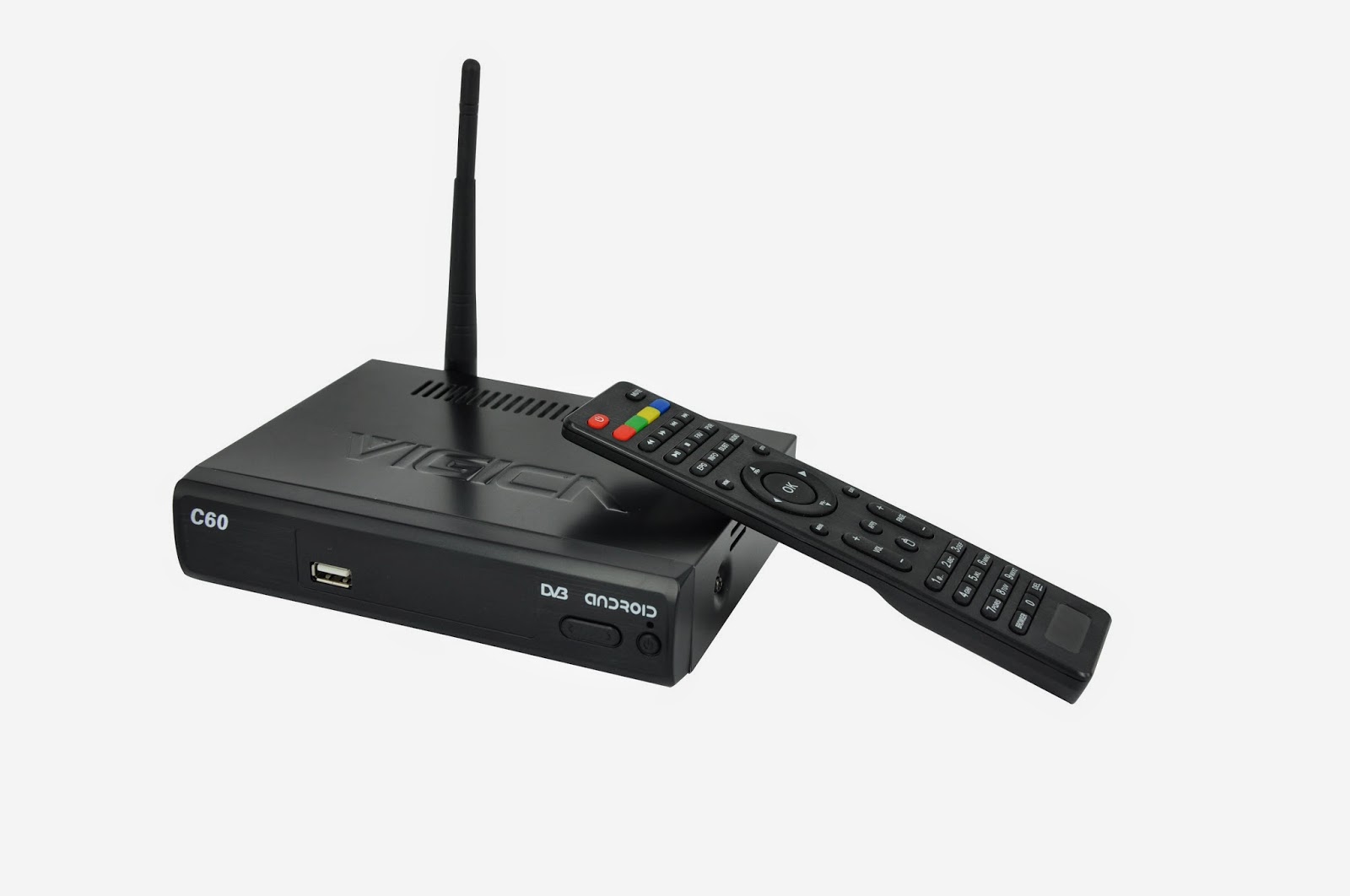
Vigica C60S/C70S Android with DVB-S2 support CCCam, Newcamd

Vigica C60T/ Vigica C70T Android with DVB-T2, Russia, Thai support

Vigica C70A Android with ATSC tuner for North American(Canada, USA,Mexico, Korea) 

Vigica C90S Android with DVB-S2 CCCam, Newcamd Quad Core TV box

Vigica C90T Android with DVB-T2 Quad Core DVB-T2 box

Vigica V3, RK3288 4K Video Quad Core TV box 

Vigica V5, S805 Quad Core TV Box

Vigica VG328, RK3288 Mini PC. Fly Mouse Ipush Dongle

http://vigicaiptvbox.blogspot.com/ 

http://www.facebook.com/vigicaiptvbox

More details please check www.vigica.cc

Thursday, December 25, 2014

Vigica IPTV Android Smart tv Box firmware download link in Google

Hello everyone.

if you want any Vigica firmware, can download from the following link,

we will update all firmware in the following.


https://drive.google.com/folderview?id=0B_AK94MdnE7wZFl3QTJGUUxJZmc&usp=sharing


Vigica C60S/ Vigica C70S Android with DVB-S2 support CCCam, Newcamd 

Vigica C60T/ Vigica C70T Android with DVB-T2, Russia, Thai support 

Vigica C70A Android with ATSC tuner for North American(Canada, USA,Mexico, Korea) 

Vigica V3, RK3288 4K Video Quad Core TV box 

Vigica V5, S805 Quad Core TV Box 

Vigica VG328, RK3288 Mini PC. Fly Mouse Ipush Dongle 

http://vigicaiptvbox.blogspot.com/ 

http://www.facebook.com/vigicaiptvbox

More details please check www.vigica.cc

Vigica Smart TV Box C60S DVB-S2 için Hakkında Yeni Güncelleme

Vigica Smart TV Box C60S DVB-S2 için Hakkında Yeni Güncelleme

Geçen hafta, biz zaten Vigica C60S ve C70S DVB-S2 CCcam kutusu için yeni firmware dışarı attılar.


Detaylar burada okuyun lütfen:

Güncelleme adımlar:


Yöntem 1
(Genellikle, kutu, normalde can güç açılmasına cant ve kutusuna sabit bir MAC yapmak istiyorum, bu yöntemi kullanın lütfen)


    Daha sonra doğrudan, daha sonra Vigica akıllı kutu ve TV HDMI Kablosunu bağlayın dosyaları koymak ve SD kart araçları yükseltme, SD kartı biçimlendirin, vigica kutusuna SD kart takın, vigica kutusuna Güç, sonra kutu içine girecek yükseltme sistemi, kutu gösteren silme sonra, vigica akıllı kutusundan SD kartı çıkarmak lütfen, sistemin kapalı güç yok lütfen. Bazı saniye sonra, kutu sonra bunu, giriş Scaaing veya klavye ile MAC adresini söyleyecektir, yine Vigica kutu sistemi, kutu olacak otomatik yeniden başlatma restard lütfen. güncelleme işlemi tamamlanmıştır.

Adım 1: güncellemesini başlatın

Adım 2: SD kartı takın ve HDMI kablosunu bağlayın

www.vigica.cc/products/hd-android-smart-tv-box-dvb-s2-android-vigica-c60s.html

Adım 3: kutusuna Güç
www.vigica.cc/products/hd-android-smart-tv-box-dvb-s2-android-vigica-c60s.html

 Adım 4: kutusu kendisi otomatik güncelleme girin gidecek
www.vigica.cc/products/hd-android-smart-tv-box-dvb-s2-android-vigica-c60s.html

Adım 5: ön panel gösteren

www.vigica.cc/products/hd-android-smart-tv-box-dvb-s2-android-vigica-c60s.html


Adım 6: kutusu gösterdikten sonra silme
www.vigica.cc/products/hd-android-smart-tv-box-dvb-s2-android-vigica-c60s.html


Adım 7: SD kartı çıkarmak

www.vigica.cc/products/hd-android-smart-tv-box-dvb-s2-android-vigica-c60s.html

Adım 8: yaklaşık 30 saniye, kutu yeniden olacak


www.vigica.cc/products/hd-android-smart-tv-box-dvb-s2-android-vigica-c60s.html


Adım 9: İlk güncellemeden sonra sisteme giren
www.vigica.cc/products/hd-android-smart-tv-box-dvb-s2-android-vigica-c60s.html


Adım 10: güncelleme başarı
www.vigica.cc/products/hd-android-smart-tv-box-dvb-s2-android-vigica-c60s.html


Yöntem 2

(Sadece hataları güncellemek istiyorsanız, kutu, bu yöntemler alışkanlık MAC yazmak için size, bu birini kullanın lütfen, iyi çalışabilir)

(: Doğrudan USBor SD kart sadece Vigica dosyaları lütfen unutmayın), USB veya SD kartına dosya koy

Vigica akıllı kutu Güç öncelikle, sonra, ana arayüzüne girmek vigica kutusuna USB veya SD kart takın, sonra, ----- Yerel yükseltme, kutu USB veya SD karttan veri okumak tüm uygulamalar içinde gitmek dosyaları, vigica Kutu başına güncellemek için gidecek seçin, ardından yeniden başlatın.

Adım 1: kutusuna güç, uygulamayı girin


Adım 2: kutusuna SD kart veya USB takın

Adım 3: Yerel yükseltme seçin


Adım 4: firmware seçin, Tamam düğmesine basın.


Adım 5: kutusu, güncelleme giren gidecek tekrar yeniden başlayacaktır.

Güncelleştirme bitmiş olacak. Daha fazla detay www.vigica.cc kontrol edebilirsiniz

http://www.vigica.cc/products/hd-android-smart-tv-box-dvb-s2-android-vigica-c60s.html

http://www.vigica.cc/products/hd-android-smart-tv-box-dvb-s2-android-vigica-c60s.html


Vigica C60S/ Vigica C70S Android with DVB-S2 support CCCam, Newcamd

Vigica C60T/ Vigica C70T Android with DVB-T2, Russia, Thai support

Vigica C70A Android with ATSC tuner for North American(Canada, USA,Mexico, Korea) 

Vigica V3, RK3288 4K Video Quad Core TV box 

Vigica V5, S805 Quad Core TV Box

Vigica VG328, RK3288 Mini PC. Fly Mouse Ipush Dongle

http://vigicaiptvbox.blogspot.com/ 

http://www.facebook.com/vigicaiptvbox

More details please check www.vigica.cc

Wednesday, December 24, 2014

How to choose a high performance android smart TV box?

 Shared Experience ! Guide to you choose a good Android smart tv box

How to choose a high performance android smart TV box?


HD and rich sources: the definition of television have become increasingly demanding for everyone. A lot of Android TV boxes provide HDMI high-definition interface, and they also have met the hardware demand. but different vendors and television source cooperation different institutions, in the above definition storage and technology have very much difference.Some manufacturers can provide high-definition TV viewing experience, but only can see few sources. So everyone at the time of purchase, pay attention to this point.

http://www.vigica.cc/products/vigica-v3-rk3288-chipset-quad-core-octa-gpu-android-hdmi-tv-box-with-tf-card-slot-and-external-an.html
Vigica V3
    
Hardware configuration:As we buy mobile phones and computers, hardware configuration is also an important indicator. CPU core count from single-core, dual-core to quad-core upgrade step by step, the memory capacity is gradually increased from 256 to 1G to 2G. In theory, the higher magnitude is better, because you can keep up with the speed of this development,the machine will not be eliminated.But we should also consider the cost, do not aimlessly pursue high-profile, enough on the line.

http://www.vigica.cc/products/hd-android-smart-tv-box-dvb-s2-android-vigica-c60s.html
Vigaca C60S

Operating System: Currently the boxes you can buy are almost Android system. Android is a more powerful and versatile operating system. Many producers who are carried out in accordance with their own Android UI optimized system.So in the side of the operating system,we should take attention to watch is the situation different vendors to optimize their own UI,is the operation easy and whether the system is running smoothly, and so on.


http://www.vigica.cc/products/android-satellite-receiver-android-dvb-s2-android-set-top-box-with-1080p-hd-xbmc-dual-core-android-4.html
Vigica C70S


Expansion capabilities: Although in the purchase of TV boxes, the most emphasis is on the function or in their ability to play HD content.Some extended functionality in addition set-top boxes provided such as: If the set-top boxes support hard disk player, whether to support LAN capabilities, can browse pictures, browse the site, and so on are also factors to consider when we buy.A good Android set-top box is not just able to watch HD video on the network, but also should be able to meet more aspects of network applications.

The firmware upgrade capability:
The hardware technology of HD set-top box is very mature at present, but the software also has further room for improvement, especially a strong compatibility, scalability can be a reality through a firmware upgrade.Therefore, when selecting boxes,the firmware upgrade capability is necessary to consider.Maybe when you buy products that do not support a certain function, but can be solved by a firmware upgrade.Some products failures can also be given via a firmware upgrade.

After-sale service: What brand is good of Android set-top box? Android set-top boxes as a new product, within the pressure of competition in the market, development speed is very fast in chip, software, hardware.Problems are inevitable. So after-sale service is extremely important. How to make up for the inherent lack of product through service, improve customer satisfaction,reputation and brand loyalty of customers, thereby establishing product reputation and enhance brand value that each player manufacturers should seriously think about.


Copyright @VIGICA 

http://www.vigica.cc/products/android-smart-tv-box-quad-core-vigica-v5.html


Vigica C60S/ Vigica C70S Android with DVB-S2 support CCCam, Newcamd

Vigica C60T/ Vigica C70T Android with DVB-T2, Russia, Thai support

Vigica C70A Android with ATSC tuner for North American(Canada, USA,Mexico, Korea) 

Vigica V3, RK3288 4K Video Quad Core TV box 

Vigica V5, S805 Quad Core TV Box

Vigica VG328, RK3288 Mini PC. Fly Mouse Ipush Dongle

http://vigicaiptvbox.blogspot.com/ 

http://www.facebook.com/vigicaiptvbox

More details please check www.vigica.cc

Wednesday, October 22, 2014

VIGICA V5 ANDROID TV BOX WITH AMLOGIC S805 Arrive!


VIGICA V5 ANDROID TV BOX WITH AMLOGIC S805 Arrive!

    Vigica release a new model called V5 which base on Amlogic S805.

    Amlogic S805 is a cost-down cpu of Amlogic S802, it is quad core cortex A5 , not powerful as the Amlogic s802 quad core cortex A9. They remove the 4K support, and make the h.265 support inside.

    As far as we know, amlogic is good at XBMC support, so seems Vigicawant to use this low-cost cpu to get some users which just need good video playback.

http://www.vigica.cc/products/android-smart-tv-box-quad-core-vigica-v5.html


    Here is the basic information about the V5:

    The appearance as following, and built in the following port:


http://www.vigica.cc/products/android-smart-tv-box-quad-core-vigica-v5.html
    RJ-45 Ethenert Jack (10/100Mbps)– don’t support 1000Mbps;
    Micro sd card slot
    USB 2.0 port
   

    System is also Android 4.4 Kitkat, and RAM change to 1GB, still use the 8GB eMMC.

    There is spdif port, so seems you can use the HDMI and Spdif passthrough.

 http://www.vigica.cc/products/android-smart-tv-box-quad-core-vigica-v5.html

Review for Amlogic S805 VIGICA V5 Quad Core TV box

Full Review for Quad Core TV box
Amlogic S805, Quad Core Vigica V5
XBMC support
H.265
http://www.vigica.cc/products/android-smart-tv-box-quad-core-vigica-v5.html

http://www.vigica.cc/products/android-smart-tv-box-quad-core-vigica-v5.html

http://www.vigica.cc/products/android-smart-tv-box-quad-core-vigica-v5.html


http://www.hdpfans.com/forum.php?mod=viewthread&tid=481732&fromuid=332637   --------from HDPfans review for vigica V5 box


Tuesday, October 21, 2014

How to use Motor (Diseqc 1.2) VIGICA C60S/C70S?


Recently some customer said to us, the Vigica TV Box C60S/C70S cant work with Motor, now give you more details to operate Motor, hope you can enjoy this box perfectly

Android hybrid TV box 
Amlogic 8726-MX VIGICA C60S/C70S


1. Enter Installation 


2. Choose some different satellite, at least 2 satellite


3. Set each satellite details in Antenna Setup, and the corresponding transponder list.


4 Go to Motor Setting , choose the first one satellite and its transponder, motor type choose diseqc 1.2


then choose move step, press ok step by step, the motor will move when you operate, until the S and Q have signal strength, the position is ok


can mark the position , then store position, you can scan the channel now.


5 Then you can choose the second and third satellite, do the same operation, you can download all channels you want


6 Last you can go to watch TV. Choose different satellite channels, the motor will go to the corresponding position.


More Detail, please contact with www.vigica.cc